This article is AI generated by Codex, Claude, and Amp. I used them all to vibe code the app into existence as well. Visit the That Tech Girl app, whose current in-app experience is called Soft Focus Code.
How That Tech Girl Actually Works: A Code Walkthrough
This post walks through a real React + Vite PWA called That Tech Girl. The current in-app experience is branded as Soft Focus Code: a daily ritual app for women in tech that mixes soft, over-the-top design with real technical learning.
It is meant to feel cute, encouraging, and slightly ridiculous in the best way. The engineering behind it now includes: deterministic daily content, local-first persistence, server-side AI calls, structured prompts, a section-aware landing page, revision cards built from your own notes, an evidence log, and theme controls that persist locally.

What the app is trying to do
At its core, That Tech Girl is designed to help with a specific kind of tech-brain spiral: the days when you feel behind, not technical enough, too quiet, too slow, or weirdly intimidated by things you are actively learning.
Instead of treating confidence and technical growth like two separate problems, the app pairs them together.
You open it and get:
- a top-level ritual card with one daily affirmation and mantra
- a matching lesson focus card
- a practical daily protocol with concrete steps
- a revision flashcard generated from your own notes
- an evidence log for wins and small receipts
- extra affirmations and project ideas in the rotation
- a bug-spray widget and palette controls for the app vibe
What happens when you open the app
Here is the product flow in plain English.
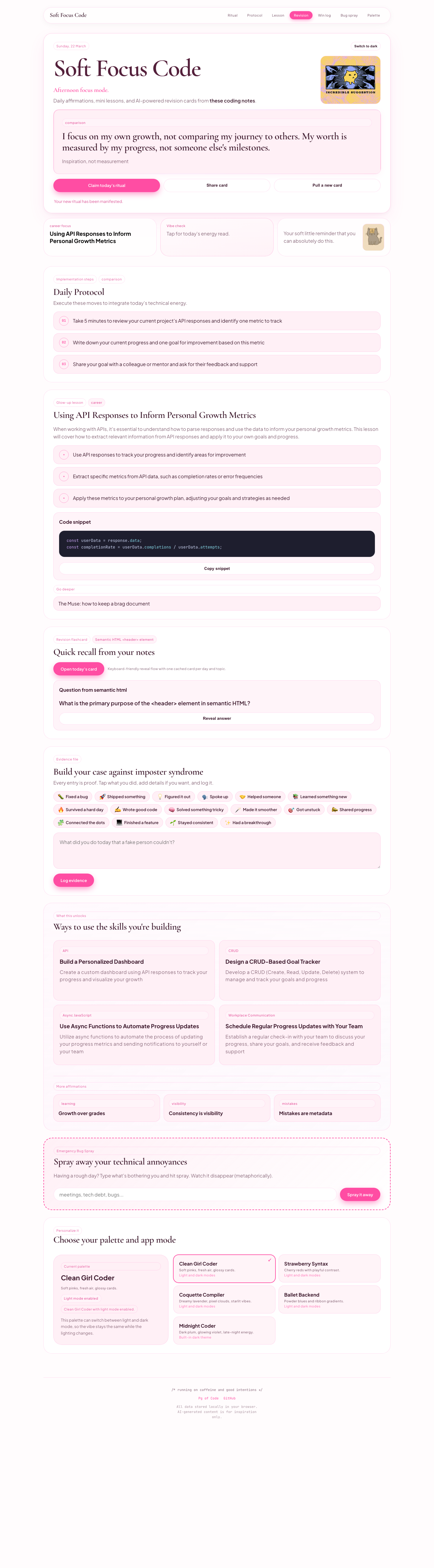
Soft Focus Code hero
Every day, the app opens on a ritual card with one affirmation, one mantra, one lesson focus, and a few quick actions. That experience begins with static fallback data so the app is never empty or broken if AI is unavailable.
Daily AI ritual
The app still has an AI generation layer. But instead of generating brand-new content every time you click around, it generates one daily AI ritual, one lesson payload, and one revision card for the day, then caches them locally.
That means:
- the app checks whether today’s AI ritual already exists in
localStorage - if it exists, it reuses it
- if not, it calls
/api/generate-daily - the result is stored and reused for the rest of the day
This is a much better experience than “roll the dice every refresh.” It makes the app feel like it has a daily edition instead of random output.
Protocol, revision, and evidence
The middle of the app is now organized into sections:
Daily Protocolfor concrete ritual stepsGlow-up lessonfor the daily concept and snippetRevisionfor a flashcard generated from your own notesWin logfor building a local evidence file against imposter syndromeWhat this unlocksfor project and career directionsBug sprayfor playful stress reliefPalettefor theme switching
That is an important product change. The app used to read more like a stack of cards. Now it behaves more like a single-page ritual dashboard with named chapters.
Revision flashcards
The revision card feature still does something more interesting than generic AI generation. It takes your own bundled Markdown notes, picks one, and asks the AI to turn one concept from that note into a quick flashcard.
Evidence log
There is also a local-only evidence log where you can save wins like shipping a feature, speaking up, fixing a bug, or finally understanding something tricky. Those entries stay in the browser and are saved in localStorage.
Themes and mode switching
The app still lets you switch between multiple palettes and mode combinations. Theme choice and dark mode preference are both saved locally too.
Now let’s look at how this actually works in code.
1. The static seed layer: src/data/content.ts
The first important file is src/data/content.ts.
This is where the app keeps its hand-written fallback content:
themeslessonsaffirmations- TypeScript types that define the shape of those things
That static layer matters because the app does not depend entirely on AI. It has a curated base layer first.
That is one of the best architecture choices in the app.
Why not let AI do everything?
Because AI is good at variation, but it should not be your whole foundation.
The static layer gives you:
- predictable fallback content
- a clear product voice
- easier development and debugging
- more control over quality
That is a useful general lesson for AI products: use AI as a layer, not as the entire structure.
The shape of an affirmation
export type Affirmation = {
  id: string;
  topic: Topic;
  text: string;
  mantra: string;
  lessonId: string;
};
If you are newer to TypeScript, this is just JavaScript plus rules about shape.
It is saying:
- every affirmation must have an
id - every affirmation must have a
topic - every affirmation must have long-form
text - every affirmation must have a shorter
mantra - every affirmation must point to a lesson using
lessonId
That last part is a simple data-modeling idea worth noticing.
Instead of copying a whole lesson into every affirmation, each affirmation just stores the lesson’s ID. That creates a relationship between the two.
This is the same kind of idea you see in databases all the time.
2. The daily algorithm: src/lib/daily.ts
The next important piece is src/lib/daily.ts.
This file picks the daily affirmation and its matching lesson.
export const getDailyPair = (date = new Date()) => {
  const hash = hashDay(date);
  const affirmation = affirmations[hash % affirmations.length];
  const lesson = lessons.find((entry) => entry.id === affirmation.lessonId) ?? lessons[0];

  const y = date.getFullYear();
  const m = String(date.getMonth() + 1).padStart(2, "0");
  const d = String(date.getDate()).padStart(2, "0");
  const dayKey = `${y}-${m}-${d}`;

  return { affirmation, lesson, dayKey };
};
This is deterministic.
That means the same date always gives you the same result.
Why is that useful?
- the fallback daily content is predictable
- the app gets a stable
dayKey - it becomes easy to cache by date
- it is easier to test and debug
This is one of those quietly important software ideas: when the same input gives the same output, your system becomes easier to reason about.
3. Why this is a PWA, not just a React app
The app is not only a React frontend. It is configured as a Progressive Web App.
That matters because a PWA gives you a few extra capabilities on top of a normal website:
- installability
- offline-ready asset caching
- standalone app-like display
- a manifest that tells the browser how the app should behave when saved to a device
In this project, the main setup lives in vite.config.ts.
VitePWA({
  registerType: "autoUpdate",
  manifest: {
    name: "That Tech Girl",
    short_name: "Tech Girl",
    display: "standalone",
    start_url: "/"
  }
})
Intermediate concept: manifest vs service worker
These two things usually get mentioned together, but they do different jobs.
- The manifest describes the app to the browser.
- The service worker controls caching and network behavior.
The manifest answers questions like:
- what is the app called?
- what icon should be used?
- should it open like a browser tab or a standalone app?
The service worker answers questions like:
- which files should be cached?
- what should still work if the network is flaky?
- how should updated assets get picked up?
That distinction is worth understanding early, because “PWA” is really a bundle of browser capabilities, not one single feature.
Why registerType: "autoUpdate" is useful
This setting tells the service worker to update itself more aggressively.
That means when you deploy a new version:
- the browser can detect updated assets
- the cached app is less likely to stay stale for too long
- users get the latest UI faster
Without that, a PWA can feel weirdly sticky after deployment, because the cache keeps serving yesterday’s version.
4. React state: what the app remembers
Most of the app logic lives in src/App.tsx.
If you are still getting comfortable with React, useState is how a component remembers values over time.
Examples in this app include:
- the selected theme
- whether dark mode is on
- the current journal text
- saved journal entries
- whether today’s ritual has been claimed
- the AI-generated daily content
- the revision flashcard
- little UI messages like “copied” or “shared”
Stored state vs derived state
This app is a good example of the difference between stored state and derived state.
Stored state is something the app actually has to remember:
const [generated, setGenerated] = useState<GeneratedContent | null>(null);
const [revision, setRevision] = useState<RevisionNote | null>(null);
const [entries, setEntries] = useState<JournalEntry[]>([]);
Derived state is something you calculate from existing state:
const displayAffirmation = generated?.affirmation ?? dailyPair.affirmation.text;
const displayMantra = generated?.mantra ?? dailyPair.affirmation.mantra;
That means:
- if AI content exists, use it
- otherwise use the static fallback
This is a good pattern because it avoids duplication. You keep one source of truth, then compute what the UI should show.
Intermediate concept: hydration and browser-only state
One subtle thing in this app is that localStorage only exists in the browser.
That means you cannot safely read it during the initial render in the same way you read static data. The app waits for the client to mount, then reads things like theme choice, journal entries, and cached AI payloads inside useEffect.
That is why you see state like:
isHydratedgeneratedCacheKeyrevisionCacheKey
The idea is:
- render safely with base data
- hydrate in the browser
- load local state
- then decide whether to fetch fresh data
This is an important mental model for modern frontend work. Some state exists immediately in your code. Some state only exists once the browser environment is available.
Intermediate concept: useMemo and useCallback
This app also uses useMemo and useCallback in places where the logic is derived from stable inputs.
For example:
dailyPairis memoized from the current date- lesson display values are derived from fallback data plus generated data
generateDailyandfetchRevisionNoteare wrapped inuseCallbackbecause effects depend on them
You do not use these hooks just to “optimize.” You use them when you need stable values or stable function references for correctness and predictability.
That is a more intermediate React idea:
- sometimes hooks are about performance
- sometimes they are about avoiding accidental re-runs and unstable dependencies
5. Local storage: the app’s tiny built-in database
This project uses localStorage a lot.
If you have not used it before, localStorage is just a browser-provided key-value store. It lets you save strings between page refreshes.
In That Tech Girl, it stores things like:
- theme choice
- dark mode preference
- journal entries
- the last claimed ritual day
- today’s cached AI ritual
- today’s cached revision card
The app centralizes those keys in one object:
const storageKeys = {
  theme: "that-tech-girl.theme",
  journal: "that-tech-girl.journal",
  claimed: "that-tech-girl.claimed-day",
  dark: "that-tech-girl.dark-mode",
  dailyAi: "that-tech-girl.daily-ai",
  dailyRevision: "that-tech-girl.daily-revision"
};
That is a small detail, but it is a good habit. It means the app is not scattering magic strings everywhere.
Why this matters beyond this app
This is basically a tiny version of local-first architecture.
That means the app can:
- feel responsive without waiting on a backend for every small thing
- remember user choices locally
- work well even with limited connectivity
- stay simple because it does not need a database for everything
For a personal ritual app, that is a great tradeoff.
Intermediate concept: cache key vs raw date
Notice that the app does not just say “store today’s data somehow.” It creates a specific cacheKey from the deterministic daily pair.
That is useful because a cache needs an exact lookup key.
- the app can ask: “do I already have content for this exact day?”
- the answer is either yes or no
- the UI can stay simple because the lookup is explicit
This is a small example of a broader engineering pattern:
cache invalidation becomes easier when your keys are explicit and deterministic.
6. The daily AI caching flow
This is the biggest behavior change compared to the earlier version of the app.
Originally, the AI feature behaved more like a remix button.
Now it behaves more like a daily issue of the app.
What happens now
The app checks localStorage for today’s cached AI content.
If it finds a cached payload with today’s dayKey, it uses that immediately.
If it does not, it calls /api/generate-daily, saves the result, and reuses it for the rest of the day.
In simplified form, the logic looks like this:
const generateWithGemini = async (force = false) => {
  if (!force) {
    const cachedDailyAi = readJsonStorage<CachedDailyContent>(storageKeys.dailyAi);
    if (cachedDailyAi?.cacheKey === cacheKey) {
      setGenerated(cachedDailyAi.content);
      return;
    }
  }

  // otherwise call /api/generate-daily
};
Even though the function name still says Gemini, the current implementation now uses Groq under the hood. The naming just has a little history stuck to it.
Intermediate concept: fallback-first UI
One of the strongest architectural ideas in this app is that the UI is never blocked on AI.
The screen already has:
- a deterministic affirmation
- a deterministic lesson
- deterministic ritual steps
Then the generated layer can enhance those values if it succeeds.
That means the app is using a fallback-first approach rather than an AI-first approach.
That is a useful product and engineering principle:
- the UI stays usable
- failures degrade gracefully
- AI becomes enhancement, not a single point of failure
Why caching is such a good idea here
Without caching, the app would:
- spend more money or tokens
- feel random instead of intentional
- change content too often
- make the “daily ritual” concept weaker
With caching, the app gets a stable daily identity.
That is not just a technical improvement. It is a product improvement.
What the AI payload includes now
The AI-generated content is not just one affirmation anymore.
It includes:
affirmationmantralessonTitlelessonSummarybulletssnippetritualStepsarchiveAffirmationsinspirationIdeas
So one AI request now powers several named sections of the page.
7. The revision flashcard route: AI from your own notes
This is one of the most useful features in the whole app.
The revision feature does not ask the model to invent a generic concept from nowhere. It takes one of your own Markdown notes and turns a real concept from that note into a flashcard.
That is a much better AI workflow than generic prompting.
The bigger concept: retrieval plus transformation
This pattern looks like this:
- get source material
- pass it to the model
- ask for a very specific transformation
In this case:
- the source is your own coding notes
- the transformation is a flashcard with question, answer, optional code example, and memory tip
This is a much more grounded use of AI, and it is a useful thing to understand if you want to build more AI-powered products later.
Intermediate concept: retrieval-augmented generation without the buzzwords
You do not need a huge vector database to learn the core idea here.
The app already demonstrates the pattern in a smaller, more understandable form:
- load trusted source material
- choose one source item
- give that source to the model
- ask the model to transform it into a specific output
That is already enough to teach an important lesson:
better AI outputs often come from better context, not from more randomness.
8. The backend: why the browser never calls the AI provider directly
The app uses backend routes for AI generation.
There are two important places to look:
server/dev-server.mjsfor local developmentfunctions/api/generate-daily.tsfor deployed serverless generationfunctions/api/revision-note.tsfor the revision-card route
The current provider is Groq, not Gemini.
Why not call Groq directly from React?
Because your API key should never live in browser code.
If it did, anyone could open DevTools and steal it.
So the app follows the standard secure pattern:
- the React frontend calls your own API route
- your route calls Groq
- Groq responds to your route
- your route sends safe JSON back to the browser
This is just standard web app architecture. AI does not change that.
Intermediate concept: local proxying during development
In local development, Vite proxies /api requests to the separate dev server:
server: {
  proxy: {
    "/api": {
      target: "http://127.0.0.1:8787"
    }
  }
}
That means your React code can still call /api/generate-daily instead of hard-coding a separate backend URL.
This is a really useful full-stack development pattern because:
- the frontend code stays clean
- the dev environment looks more like production
- you avoid sprinkling hostnames through your app
If you are learning modern frontend, understanding the dev proxy is a big step up from only thinking in terms of one server.
9. Prompt design: why the model returns structured JSON
The /api/generate-daily route does not simply ask the model to “write something cute.”
It tells the model exactly what shape to return.
That matters because the frontend is not reading prose like a human. It needs structured data it can render.
The prompt expects JSON with fields like:
affirmationmantralessonTitlelessonSummarybulletsritualStepsarchiveAffirmationsinspirationIdeas
This is one of the most important lessons in building AI features:
if the UI depends on the output, the output needs structure.
Otherwise your frontend becomes fragile very quickly.
Topic-specific prompt guidance matters too
The prompt also includes guidance for topics like:
- visibility
- pacing
- imposter syndrome
- mistakes
- comparison
- communication
That is important because an app like this is not just generating syntax-shaped content. It is generating emotionally specific content.
A topic like communication should not sound like generic self-help. A topic like mistakes should not make errors sound like moral failure. A topic like visibility should not confuse quiet contribution with lack of impact.
That kind of nuance comes from product direction, not from the model automatically understanding your intent.
Intermediate concept: schema-shaped prompting
The prompt is doing more than asking for content. It is acting like a lightweight schema.
That means the prompt is effectively telling the model:
- what keys must exist
- what each field means
- how many items belong in each array
- what tone and topic boundaries apply
That is why the frontend can trust the response enough to map it into specific UI sections.
You can think of this as halfway between plain prompting and full validation.
It is not as strict as a runtime schema checker, but it pushes the model toward outputs that behave like structured application data rather than creative prose.
10. Navigation and section awareness: how the app knows where you are
The new app shell has a section nav at the top:
- Ritual
- Protocol
- Lesson
- Revision
- Win log
- Bug spray
- Palette
That nav is not hard-coded to stay active on one item. The app uses IntersectionObserver to watch which section is in view and update activeSection.
This is a great intermediate browser concept to learn.
Why IntersectionObserver is better than scroll math here
You could try to do this with scrollY and manual position calculations, but that gets messy fast.
IntersectionObserver lets the browser tell you when elements are entering or leaving the viewport.
That gives you:
- cleaner code
- less manual measurement
- easier section-aware navigation
- better performance than constantly running your own scroll calculations
This is the kind of browser API that makes a UI feel more sophisticated without adding much code.
11. CRUD, APIs, and async JavaScript: how this app quietly teaches them
This app is also useful because the lessons inside it reflect actual web-development foundations you are learning.
CRUD
CRUD stands for:
- Create
- Read
- Update
- Delete
These are the four basic actions most apps perform on data.
When the app teaches you to think about CRUD as user actions instead of abstract database verbs, that is a very practical mental shift.
Instead of thinking:
- “I need a POST route”
You start thinking:
- “The user is trying to create a task”
- “The user is trying to update a profile”
- “The user needs confirmation that something was deleted”
That is a more product-minded way to think about backend and frontend work.
APIs
An API is just a way for two systems to talk to each other.
In this app, the frontend talks to:
/api/generate-daily/api/revision-note
Those routes return structured data the app can use.
Learning APIs is not just learning fetch(). It is learning:
- what data shape is expected
- what happens when the request fails
- where validation belongs
- how the frontend should behave while waiting
This app gives you a compact version of that whole cycle.
Async JavaScript
Any time the app waits for the AI route to respond, it is doing async work.
That means:
- the request takes time
- the UI needs loading states
- the app needs to handle errors
- the screen should stay usable while waiting
That is what async/await is helping with.
If you are learning JavaScript right now, this is a very practical example of async logic tied to a real product instead of a toy exercise.
12. Why the app still matters even though AI is in the loop
One easy mistake is to assume that once AI is involved, the “real” engineering disappears.
But this app still depends on:
- state management
- caching
- layout systems
- theme logic
- safe API boundaries
- structured prompts
- fallback data
- UI affordances and copy decisions
In other words: the app still needs software design.
The AI part is only one layer.
That is why projects like this are so useful for learning. They force you to combine product thinking, frontend state, backend structure, data modeling, and prompt design in one place.
A good mental model for the whole thing
If you want one simple summary, I would describe the app like this:
- the static seed layer gives it a spine
- the daily deterministic logic gives it a schedule
- local storage gives it memory
- the backend gives it a safe way to use AI
- the prompt gives the model constraints
- caching turns AI output into a stable daily experience instead of random churn
If you want the slightly more intermediate version of that same summary, it is this:
- the manifest makes it installable
- the service worker makes it behave more like an app
- deterministic keys make caching reliable
- local storage gives the interface memory
- React state separates stored values from derived display values
- backend routes keep secrets out of the browser
- structured prompts turn model output into UI-shaped data
- browser APIs like
IntersectionObservermake the single-page flow feel deliberate